
人類は競争することなく地球を支配しています。しかし、人類はそれを変えるかもしれないものを作ろうとしています。 人類が開発している「それ」は、人類最後の発明であり、史上最も強力なツール・武器、あるいは実体である可能性すらあります。それが人工知能(AI)です。
⇧ 意図的に悪意のあるAI、野良AIなど、人間の管理を逸脱するAIが生成され得るリスクが存在するのは、想定してるはずだと思うんだけど、リスクに対する具体的な対策って検討されてるんかね?
残念ながら、最終的に自己生成が可能になるであろうAIに対して、
ロボット工学三原則(ロボットこうがくさんげんそく、英語: Three Laws of Robotics)とは、SF作家アイザック・アシモフのSF小説において、ロボットが従うべきとして示された原則である。ロボット三原則とも言われる。
「人間への安全性、命令への服従、自己防衛」を目的とする3つの原則から成る。
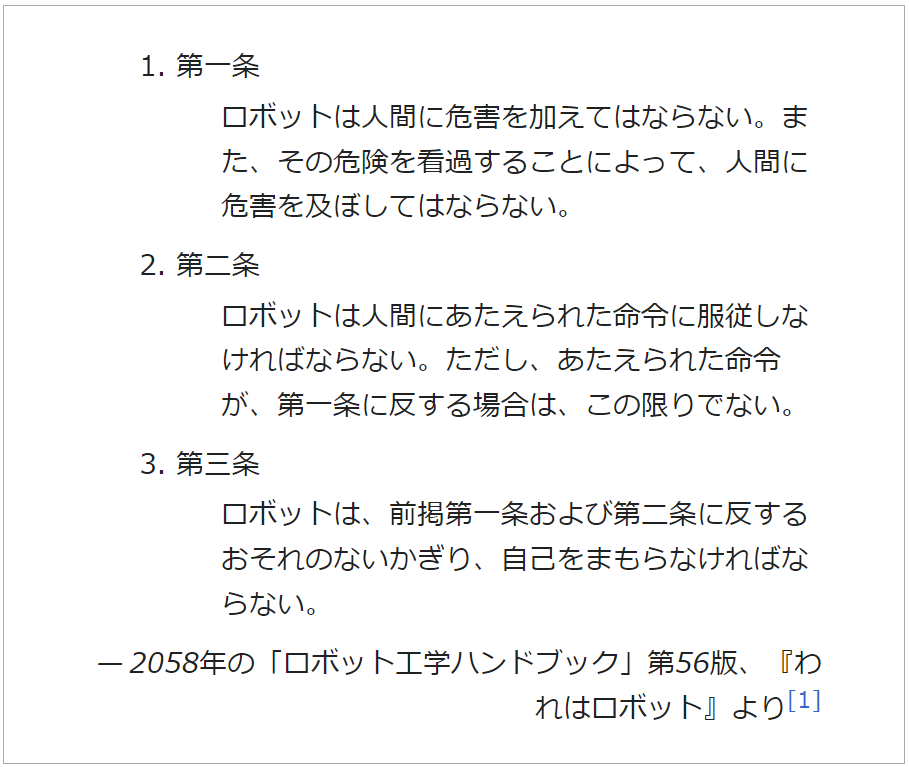
⇧ みたいな規制を導入させるのは難しそうですしね...
まぁ、『AIは人類最後の発明になってしまうのか?』ってのは、「煽り文」みたいなものを意図しているのか分かりませんが、世に出ていないだけで発明されてるものは、いくらでもありそうですけど...
実現可能かどうかはさておき、「タイムマシン」とか「空間転送装置」とか発明して欲しいものは、まだまだ数えきれないほどありますし...
個人的には、ソフトウェア開発を楽にするツールを発明して欲しい今日この頃です...
Visual Studio CodeでSQL文の構文チェックとか自動フォーマットとかさせたかったのだが...
プログラミング言語みたいに、SQL文でもコーディング時に、静的解析とか自動フォーマットとかして欲しいな、と思いました、人間だもの。
というわけで、「VS Code(Visual Studio Code)」で良しなにできないのか、ネットの情報を漁ってみた感じでは、
SQLFluff is a dialect-flexible and configurable SQL linter.
Designed with ELT applications in mind, SQLFluff also works with Jinja templating and dbt. SQLFluff will auto-fix most linting errors, allowing you to focus your time on what matters.
⇧「SQLFluff」というライブラリが、「SQL」の「静的解析」を行ってくれそうですと。
「VS Code(Visual Studio Code)」の「拡張機能」としては、
A linter and auto-formatter for SQLFluff, a popular linting tool for SQL and dbt.
https://marketplace.visualstudio.com/items?itemName=dorzey.vscode-sqlfluff
⇧「sqlfluff」というものをインストールすれば良い模様。
VS Code(Visual Studio Code)で「SQLFluff」を利用できるようにしてみたものの...
ちなみに、2024年8月13日(火)現在、
⇧ issueで上がっている通り、「SQLFluff」については、標準のSQLの文法にしか対応しておらず、「PL/pgSQL」で作成する、
- function
- procesure
などの「ストアドプロシージャ」には対応していないという残念なお知らせ...
なので、「PL/pgSQL」でも構文チェックなどを行いたい場合は、
⇧ 上記サイト様の説明にありますように、
- 「PL/pgSQL Language Server」という拡張機能をインストールする
- VS Code(Visual Studio Code)を利用しない。
→ PL/pgSQLに対応した「統合開発環境(IDE:Integrated Development Environment)」の利用を検討する
のいずれかで対応していくしか無さそうね...
stackoverflowでも仰っておられますが、
⇧ 有償のツールであれば、「PL/pgSQL」であろうと良しなに構文チェックとかしてくれるっぽいですな。
つまり、「お金」で解決する、まさに「金の弾丸」と言ったところでしょうか...
まぁ、「お金」があれば何でもできてしまう世の中ですからな...
話が脱線しましたが、以下、「SQLFluff」が「PL/pgSQL」に対応していないのは知らなかったので、全く意味の無い作業になってしまいますが、「SQLFluff」を導入してみた備忘録として作業記録を残したいと思います。
とりあえず、
- pipで「sqlfluff」をインストールする
- 「VS Code(Visual Studio Code)」の拡張機能「sqlfluff」をインストールする
最低限、上記のライブラリをインストールする必要がありそうなので、インストールしていきます。
Pythonが利用できる環境である必要があるので、Pythonがインストールされているか確認しておきましょう。
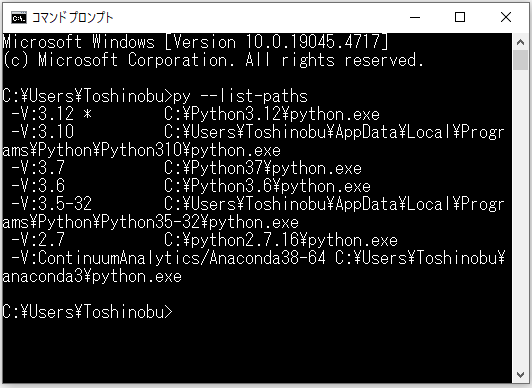
⇧ 自分は、Windows 10 Homeを利用しているのですが、Python 3.12が有効になっている状態です。
それでは、「SQLFluff」というライブラリを利用できるようにしていきたいと思います。
環境は、
⇧ 上記の記事の時のものを利用していきます。
■1. pipで「sqlfluff」をインストールする
まずは、Python仮想環境にログインし、
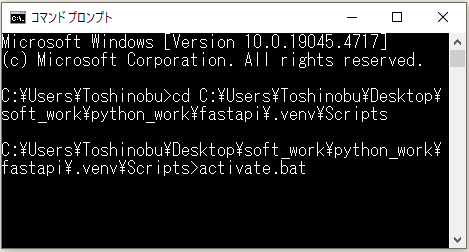
pipコマンドで「sqlfluff」をインストールします。

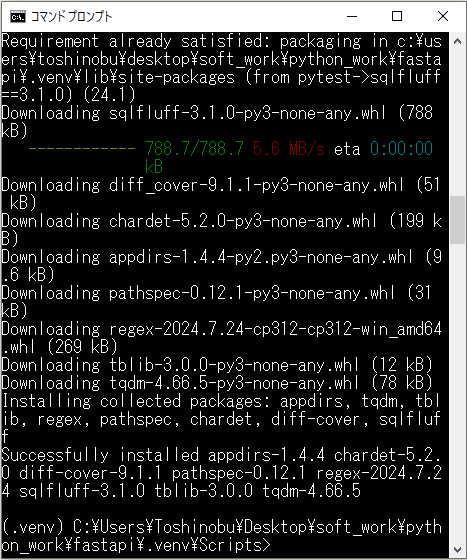
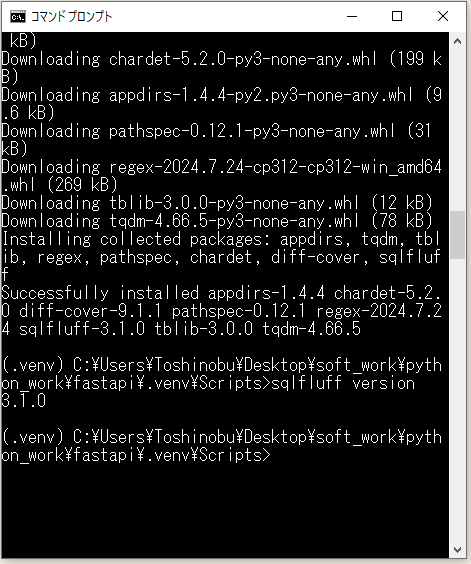
⇧ インストールできたようです。
■2. 「VS Code(Visual Studio Code)」の拡張機能「sqlfluff」をインストールする
続いて、「VS Code(Visual Studio Code)」の「拡張機能」で「sqlfluff」というものをインストールします。


で、エラー。

何か、分からんが、
に対応する必要がありそう。
良しなに設定とかされないのは、Python仮想環境とかを利用しているせいなんかな?
ネットの情報とか見ても、端折られてるから分からないのですが、エラーが起きたって話が出て来ないのですが、少なくとも自分の環境では、実際問題としてエラーが出てしまったので、対応方法を残しておきます。
「.sqlfluff」ファイルを追加。
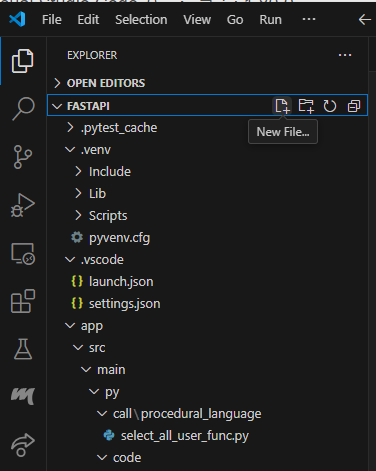
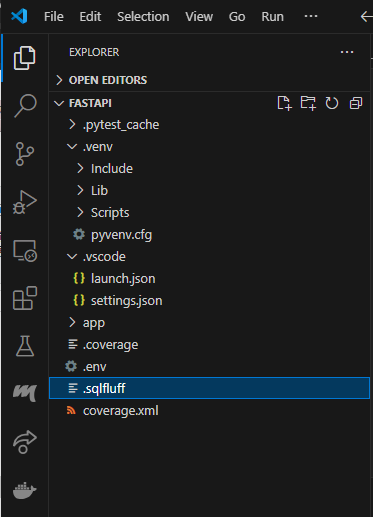
「.sqlfluff」ファイルは以下のような感じにしてます。
■C:\Users\Toshinobu\Desktop\soft_work\python_work\fastapi\.sqlfluff
[sqlfluff]
# verbose is an integer (0-2) indicating the level of log output
verbose = 0
# Turn off color formatting of output
nocolor = False
# Supported dialects https://docs.sqlfluff.com/en/stable/dialects.html
# Or run 'sqlfluff dialects'
dialect = postgres
exclude_rules = ST06

[sqlfluff:indentation]
tab_space_size = 2
indent_unit = space
⇧ 上記のような感じで保存。
ちなみに、現状のsqlfluffの設定で有効になっているものは、「sqlfluff rules」コマンドで確認できる模様。(自分は、Python仮想環境でpython系のライブラリをインストールしているので、Python仮想環境でコマンドを実施してます。)
(.venv) C:\Users\Toshinobu\Desktop\soft_work\python_work\fastapi>sqlfluff rules
==== sqlfluff - rules ====
AL01: [aliasing.table] Implicit/explicit aliasing of table.
      groups: all, aliasing aliases: L011
AL02: [aliasing.column] Implicit/explicit aliasing of columns.
      groups: all, core, aliasing aliases: L012
AL03: [aliasing.expression] Column expression without alias. Use
      explicit `AS` clause.
      groups: all, core, aliasing aliases: L013
AL04: [aliasing.unique.table] Table aliases should be unique within
      each clause.
      groups: all, core, aliasing, aliasing.unique aliases:
      L020
AL05: [aliasing.unused] Tables should not be aliased if that alias is
      not used.
      groups: all, core, aliasing aliases: L025
AL06: [aliasing.length] Enforce table alias lengths in from clauses and
      join conditions.
      groups: all, core, aliasing aliases: L066
AL07: [aliasing.forbid] Avoid table aliases in from clauses and join
      conditions.
      groups: all, aliasing aliases: L031
AL08: [aliasing.unique.column] Column aliases should be unique within
      each clause.
      groups: all, core, aliasing, aliasing.unique
AL09: [aliasing.self_alias.column] Column aliases should not alias to
      itself, i.e. self-alias.
      groups: all, core, aliasing
AM01: [ambiguous.distinct] Ambiguous use of 'DISTINCT' in a 'SELECT'
      statement with 'GROUP BY'.
      groups: all, core, ambiguous aliases: L021
AM02: [ambiguous.union] 'UNION [DISTINCT|ALL]' is preferred over just
      'UNION'.
      groups: all, core, ambiguous aliases: L033
AM03: [ambiguous.order_by] Ambiguous ordering directions for columns in
      order by clause.
      groups: all, ambiguous aliases: L037
AM04: [ambiguous.column_count] Query produces an unknown number of
      result columns.
      groups: all, ambiguous aliases: L044
AM05: [ambiguous.join] Join clauses should be fully qualified.
      groups: all, ambiguous aliases: L051
AM06: [ambiguous.column_references] Inconsistent column references in
      'GROUP BY/ORDER BY' clauses.
      groups: all, core, ambiguous aliases: L054
AM07: [ambiguous.set_columns] Queries within set query produce
      different numbers of columns.
      groups: all, ambiguous aliases: L068
CP01: [capitalisation.keywords] Inconsistent capitalisation of
      keywords.
      groups: all, core, capitalisation aliases: L010
CP02: [capitalisation.identifiers] Inconsistent capitalisation of
      unquoted identifiers.
      groups: all, core, capitalisation aliases: L014
CP03: [capitalisation.functions] Inconsistent capitalisation of
      function names.
      groups: all, core, capitalisation aliases: L030
CP04: [capitalisation.literals] Inconsistent capitalisation of
      boolean/null literal.
      groups: all, core, capitalisation aliases: L040
CP05: [capitalisation.types] Inconsistent capitalisation of datatypes.
      groups: all, core, capitalisation aliases: L063
CV01: [convention.not_equal] Consistent usage of '!=' or '<>' for "not
      equal to" operator.
      groups: all, convention aliases: L061
CV02: [convention.coalesce] Use 'COALESCE' instead of 'IFNULL' or
      'NVL'.
      groups: all, convention aliases: L060
CV03: [convention.select_trailing_comma] Trailing commas within select
      clause.
      groups: all, core, convention aliases: L038
CV04: [convention.count_rows] Use consistent syntax to express "count
      number of rows".
      groups: all, core, convention aliases: L047
CV05: [convention.is_null] Comparisons with NULL should use "IS" or "IS
      NOT".
      groups: all, core, convention aliases: L049
CV06: [convention.terminator] Statements must end with a semi-colon.
      groups: all, convention aliases: L052
CV07: [convention.statement_brackets] Top-level statements should not
      be wrapped in brackets.
      groups: all, convention aliases: L053
CV08: [convention.left_join] Use 'LEFT JOIN' instead of 'RIGHT JOIN'.
      groups: all, convention aliases: L055
CV09: [convention.blocked_words] Block a list of configurable words
      from being used.
      groups: all, convention aliases: L062
CV10: [convention.quoted_literals] Consistent usage of preferred quotes
      for quoted literals.
      groups: all, convention aliases: L064
CV11: [convention.casting_style] Enforce consistent type casting style.
      groups: all, convention aliases: L067
JJ01: [jinja.padding] Jinja tags should have a single whitespace on
      either side.
      groups: all, core, jinja aliases: L046
LT01: [layout.spacing] Inappropriate Spacing.
      groups: all, core, layout aliases: L001, L005, L006, L008,
      L023, L024, L039, L048, L071
LT02: [layout.indent] Incorrect Indentation.
      groups: all, core, layout aliases: L002, L003, L004
LT03: [layout.operators] Operators should follow a standard for being
      before/after newlines.
      groups: all, layout aliases: L007
LT04: [layout.commas] Leading/Trailing comma enforcement.
      groups: all, layout aliases: L019
LT05: [layout.long_lines] Line is too long.
      groups: all, core, layout aliases: L016
LT06: [layout.functions] Function name not immediately followed by
      parenthesis.
      groups: all, core, layout aliases: L017
LT07: [layout.cte_bracket] 'WITH' clause closing bracket should be on a
      new line.
      groups: all, core, layout aliases: L018
LT08: [layout.cte_newline] Blank line expected but not found after CTE
      closing bracket.
      groups: all, core, layout aliases: L022
LT09: [layout.select_targets] Select targets should be on a new line
      unless there is only one select target.
      groups: all, layout aliases: L036
LT10: [layout.select_modifiers] 'SELECT' modifiers (e.g. 'DISTINCT')
      must be on the same line as 'SELECT'.
      groups: all, core, layout aliases: L041
LT11: [layout.set_operators] Set operators should be surrounded by
      newlines.
      groups: all, core, layout aliases: L065
LT12: [layout.end_of_file] Files must end with a single trailing
      newline.
      groups: all, core, layout aliases: L009, layout.end-of-
      file
LT13: [layout.start_of_file] Files must not begin with newlines or
      whitespace.
      groups: all, layout aliases: L050
RF01: [references.from] References cannot reference objects not present
      in 'FROM' clause.
      groups: all, core, references aliases: L026
RF02: [references.qualification] References should be qualified if
      select has more than one referenced table/view.
      groups: all, references aliases: L027
RF03: [references.consistent] References should be consistent in
      statements with a single table.
      groups: all, references aliases: L028
RF04: [references.keywords] Keywords should not be used as identifiers.
      groups: all, references aliases: L029
RF05: [references.special_chars] Do not use special characters in
      identifiers.
      groups: all, references aliases: L057
RF06: [references.quoting] Unnecessary quoted identifier.
      groups: all, references aliases: L059
ST01: [structure.else_null] Do not specify 'else null' in a case when
      statement (redundant).
      groups: all, structure aliases: L035
ST02: [structure.simple_case] Unnecessary 'CASE' statement.
      groups: all, structure aliases: L043
ST03: [structure.unused_cte] Query defines a CTE (common-table
      expression) but does not use it.
      groups: all, core, structure aliases: L045
ST04: [structure.nested_case] Nested 'CASE' statement in 'ELSE' clause
      could be flattened.
      groups: all, structure aliases: L058
ST05: [structure.subquery] Join/From clauses should not contain
      subqueries. Use CTEs instead.
      groups: all, structure aliases: L042
ST07: [structure.using] Prefer specifying join keys instead of using
      'USING'.
      groups: all, structure aliases: L032
ST08: [structure.distinct] 'DISTINCT' used with parentheses.
      groups: all, structure, core aliases: L015
ST09: [structure.join_condition_order] Joins should list the table
      referenced earlier/later first.
      groups: all, structure
TQ01: [tsql.sp_prefix] 'SP_' prefix should not be used for user-defined
      stored procedures in T-SQL.
      groups: all, tsql aliases: L056
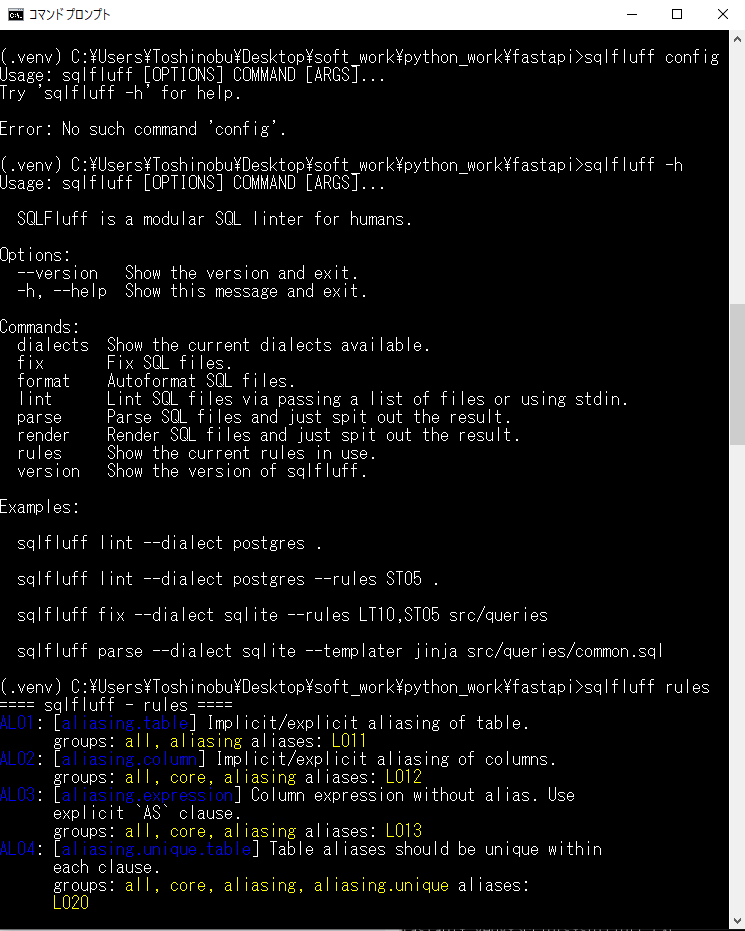
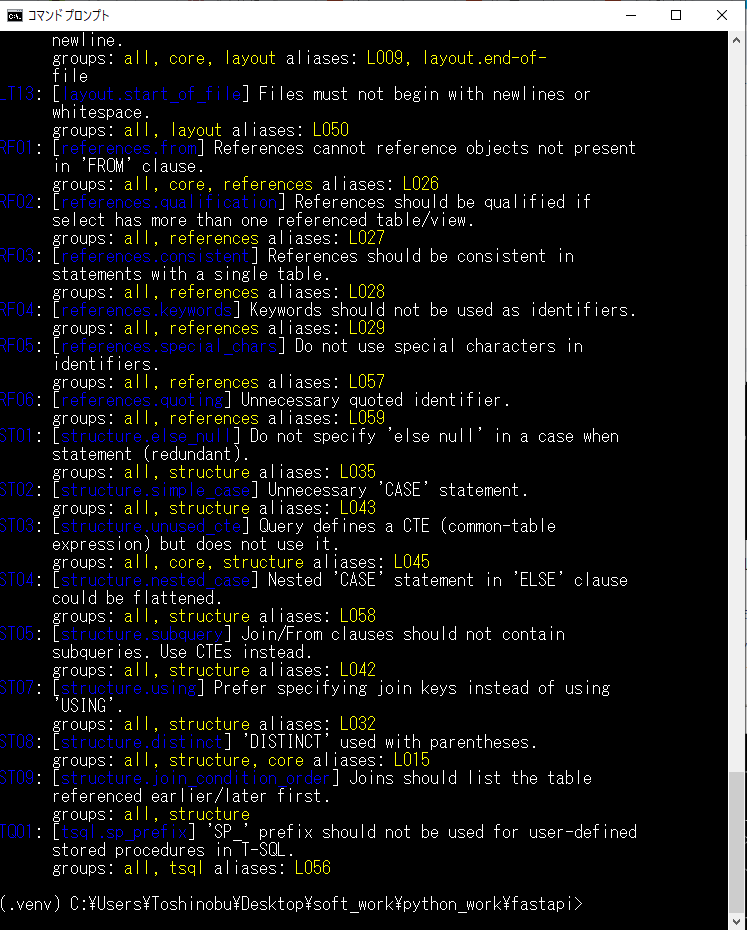
⇧ 確かに、「.sqlfluff」ファイルで、「ST06」のルールを除外するとしたので、「ST06」は表示されていません。(全量が把握し辛くなるので、非表示にするのではなく、有効か無効かの状態の切り替えにして欲しいが...)
で、「.vscode/settings.json」に「.sqlfluff」ファイルまでのパスを設定する。
その際に、Python仮想環境で「sqlfluff」をpip installしている場合に、「sqlfluff」の実行ファイルのパスを、「.vscode/settings.json」に追加する必要があるらしいので、パスを確認する。
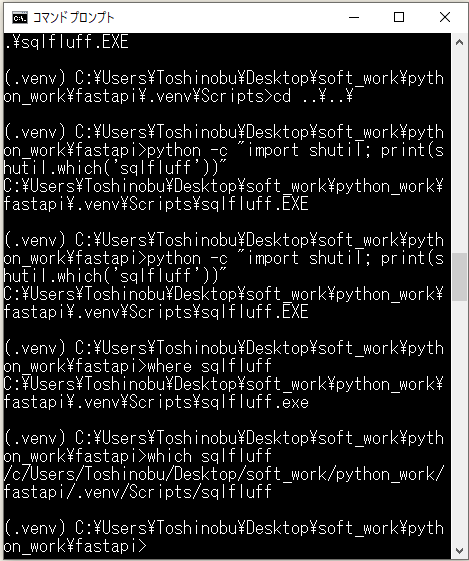
確認できたら、「.vscode/settings.json」に設定を追加。
■C:\Users\Toshinobu\Desktop\soft_work\python_work\fastapi\.vscode\settings.json
/**
 * VS Code(Visual Studio Code)の仕様で、
 *  ・「settings.json」
 *  ・「tasks.json」
 *  ・「launch.json」
 * の3つのJSONファイルには「コメントアウト」が利用できるらしい。
 * https://code.visualstudio.com/docs/languages/json#_json-with-comments
 */
// In addition to the default JSON mode following the JSON specification,
// VS Code also has a JSON with Comments (jsonc) mode.
// This mode is used for the VS Code configuration files such as
// ・settings.json,
// ・tasks.json,
// or
// ・launch.json.
// When in the JSON with Comments mode, you can use
// ・single line (//)
// as well as
// ・block comments (/* */)
// as used in JavaScript.
// The mode also accepts trailing commas, but they are discouraged and the editor will display a warning.
//
// The current editor mode is indicated in the editor's Status Bar.
// Select the mode indicator to change the mode and to configure how file extensions are associated to modes.
// You can also directly modify the files.associations setting to associate file names or file name patterns to jsonc.

{
  "python.analysis.extraPaths": [
    // "${workspaceFolder}"
    // ,"${workspaceFolder}/app"
    // ,"${workspaceFolder}/app/src"
    // ,"${workspaceFolder}/app/src/controller"
    // ,"${workspaceFolder}/app/src/entity"
    // ,"${workspaceFolder}/app/src/repository"
    // ,"${workspaceFolder}/app/src/service"
  ],
  // sqlfluffの設定
  "sqlfluff.config": "${workspaceFolder}/.sqlfluff",
  "sqlfluff.executablePath": "${workspaceFolder}/.venv/Scripts/sqlfluff",
  // フォーマッターの設定
  "[python]": {
    "editor.defaultFormatter": "ms-python.black-formatter",
    //"editor.defaultFormatter": null,
    "editor.insertSpaces": true,
    "editor.tabSize": 2,
    "editor.formatOnSave": true
  },

  // 【Windowsの設定】VS Code(Visual Studio Code)上で、環境模様「PYTHONPATH」に追加
  "terminal.integrated.env.windows": {
    "PYTHONPATH": "${workspaceFolder};${workspaceFolder}/app"
  },
  // 【Linuxの設定】VS Code(Visual Studio Code)上で、環境模様「PYTHONPATH」に追加
  "terminal.integrated.env.linux": {
    "PYTHONPATH": "${workspaceFolder}:${workspaceFolder}/app"
  },
  // VS Code(Visual Studio Code)上で、.envファイルを認識させる
  "python.envFile": "${workspaceFolder}/.env",
  // VS Code(Visual Studio Code)上のExplorerで非表示にしたいファイル、フォルダ
  "files.exclude": {
    "**/*.pyc": { "when": "$(basename).py" },
    "**/__pycache__": true
  },

  //
  "debugpy.showPythonInlineValues": true,

  // pytestの設定
  "python.testing.unittestEnabled": false,
  "python.testing.pytestEnabled": true,
  "python.testing.pytestArgs": [
    "--cov=.",
    "--cov-report",
    "xml",
    "--capture=no"
  ],
  "coverage-gutters.showGutterCoverage": false,
  "coverage-gutters.showLineCoverage": true
}
⇧ で、保存。
SQLファイルで、ルール違反を指摘してくれる模様、ただ、行末尾の『半角スペースが不要』とか、そのあたりは、指摘されてもあんまり嬉しくはないぞ!
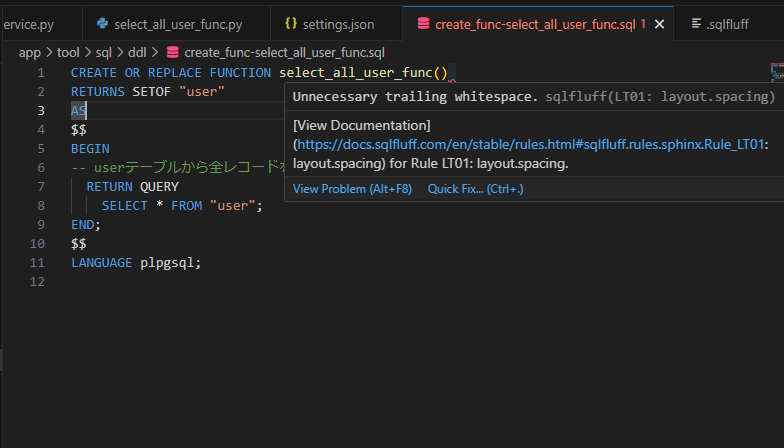
何だろう、しっかり自動フォーマットとか、構文のチェックとかしてくれるのか不安なんだが...
ちなみに、「PL/pgSQL」で作成した「function」、所謂「ストアドプロシージャ」に対して「SQLFluff」を試したせいなのか(今のところ、「SQLFluff」は通常のSQL文にしか対応していないっぽいので)、インデント崩れとか自動フォーマットしてくれないんだが...
普通のSELECT文とかであれば、機能するんかな?
環境構築せずとも、「統合開発環境(IDE:Integrated Development Environment)」の機能とかでお任せできればありがたいんですけどね...
「VS Code(Visual Studio Code)」は、設定が面倒過ぎるんよね...
まぁ、「お金」をかけられる開発プロジェクトであるなら、「お金」の力に頼るのが良い気はしますな...
毎度モヤモヤ感が半端ない…
今回はこのへんで。
