
セキュリティ企業のDepthFirstがウェブサーバーソフトウェア「NGINX」のソースコードを自社の解析システムに読み込ませたところ複数の問題が検出され、そのうち4件のメモリ破壊系の問題がNGINX側に確認されたとのこと。中でもリモートコード実行につながる可能性がある脆弱(ぜいじゃく)性「CVE-2026-42945」は、2008年に入り込んだとされるヒープバッファオーバーフローで「18年近く見逃されていた」と述べられています。
⇧ Oh, my gosh...
LinuxのパッケージTimescaleDBの依存リポジトリが知りたかったのだが...
PostgreSQLの拡張機能であるTimescaleDBは、
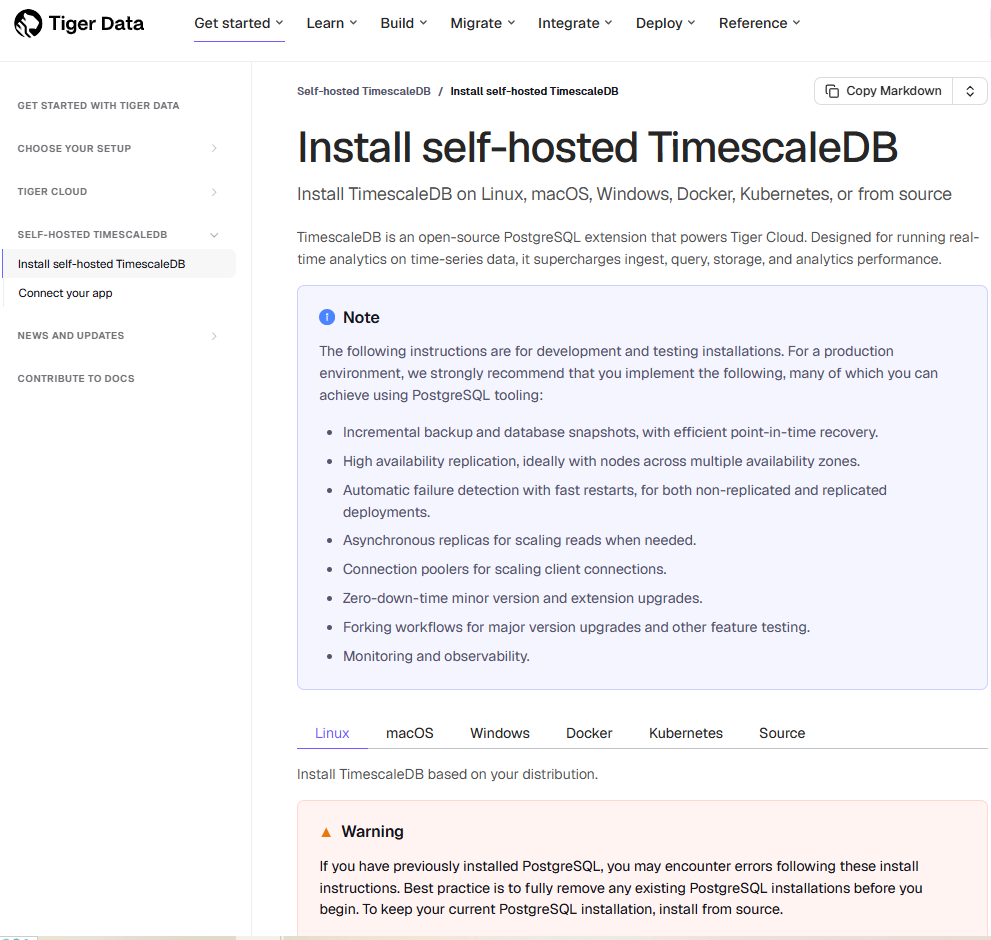
⇧ 上記の公式の「ドキュメント」にありますように、主要な「Linux ディストリビューション」毎に「パッケージ」の「リポジトリ」が用意されておりますと。
そして、
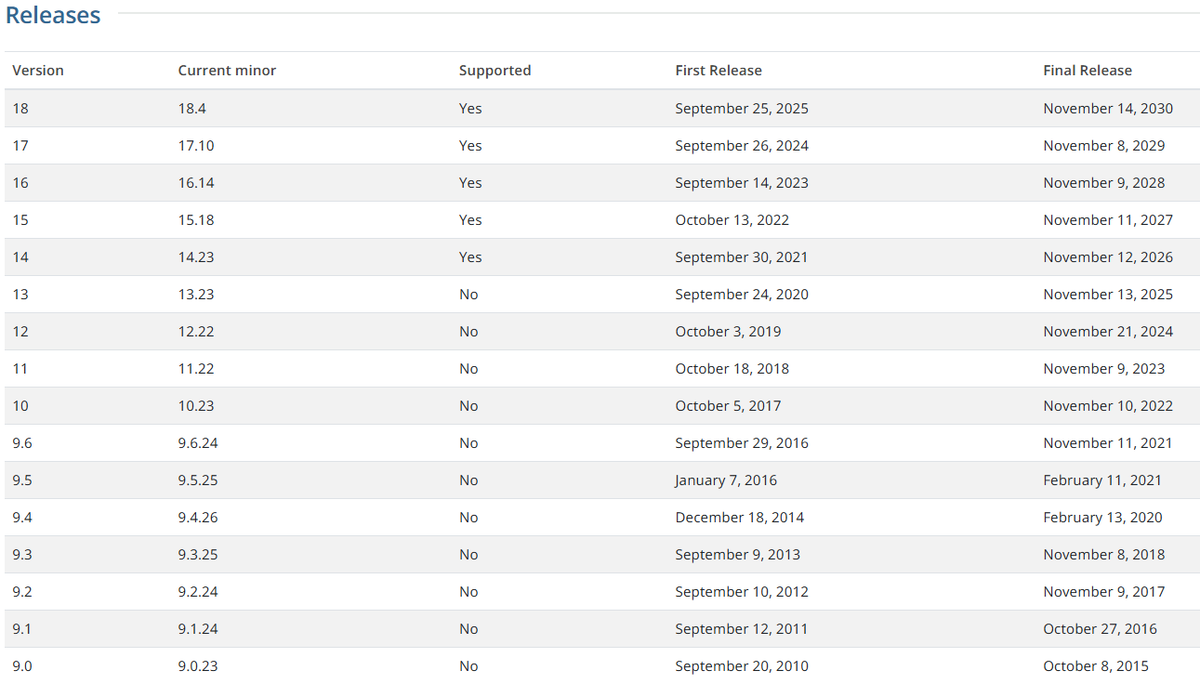
⇧ 上記の「PostgreSQL」の公式の「ドキュメント」によりますと、「Supportd」が「No」になっているものが、「EoL(End of Life)」になっている模様。
「TimescaleDB」は「PostgreSQL」の拡張機能であるとのことなので、「TimescaleDB」の「パッケージ」をインストールする際に、「PostgreSQL」の「パッケージ」の「リポジトリ」に依存していると面倒なことになるので、表題の件。
とりあえず、
⇧ 上記サイト様を参考に、「WSL 2(Windows Subsystem for Linux 2)」に「Rocky Linux 8.10」の環境を用意。
sudo tee /etc/yum.repos.d/timescale_timescaledb.repo <<EOL
[timescale_timescaledb]
name=timescale_timescaledb
baseurl=https://packagecloud.io/timescale/timescaledb/el/$(rpm -E %{rhel})/\$basearch
repo_gpgcheck=1
gpgcheck=0
enabled=1
gpgkey=https://packagecloud.io/timescale/timescaledb/gpgkey
sslverify=1
sslcacert=/etc/pki/tls/certs/ca-bundle.crt
metadata_expire=300
EOL
yum update
ローカルに存在するリポジトリの状態
[root@DESKTOP-JG9SBOV toshinobu]# ls -la /etc/yum.repos.d/
total 68
drwxr-xr-x  2 root root 4096 May 15 18:09 .
drwxr-xr-x 44 root root 4096 May 15 18:11 ..
-rw-r--r--  1 root root  710 May  9 01:03 Rocky-AppStream.repo
-rw-r--r--  1 root root  695 May  9 01:03 Rocky-BaseOS.repo
-rw-r--r--  1 root root 1773 May  9 01:03 Rocky-Debuginfo.repo
-rw-r--r--  1 root root  360 May  9 01:03 Rocky-Devel.repo
-rw-r--r--  1 root root  695 May  9 01:03 Rocky-Extras.repo
-rw-r--r--  1 root root  731 May  9 01:03 Rocky-HighAvailability.repo
-rw-r--r--  1 root root  680 May  9 01:03 Rocky-Media.repo
-rw-r--r--  1 root root  680 May  9 01:03 Rocky-NFV.repo
-rw-r--r--  1 root root  690 May  9 01:03 Rocky-Plus.repo
-rw-r--r--  1 root root  715 May  9 01:03 Rocky-PowerTools.repo
-rw-r--r--  1 root root  746 May  9 01:03 Rocky-ResilientStorage.repo
-rw-r--r--  1 root root  681 May  9 01:03 Rocky-RT.repo
-rw-r--r--  1 root root 1425 May  9 01:03 Rocky-Security.repo
-rw-r--r--  1 root root 2335 May  9 01:03 Rocky-Sources.repo
-rw-r--r--  1 root root  147 May 15 18:05 timescale_timescaledb.repo
[root@DESKTOP-JG9SBOV toshinobu]#
⇧ 上記にあるように「PostgreSQL」の「パッケージ」の「リポジトリ」はインストールされていない状態。
そして、「ChatGPT」氏に、
『Linuxのパッケージtimescaledb2-postgresql-12に依存するリポジトリを確認する方法を教えて』
と質問してみたところ、以下のような回答が返ってきた。
(
printf "%-40s %-30s %-30s\n" PACKAGE VERSION-RELEASE REPOSITORY

dnf repoquery \
  --requires \
  --resolve \
  --qf '%-40{name} %-30{version}-%{release} %-30{repoid}' \
  timescaledb-2-postgresql-12
) | column -t
[root@DESKTOP-JG9SBOV toshinobu]# (
> printf "%-40s %-30s %-30s\n" PACKAGE VERSION-RELEASE REPOSITORY
>
> dnf repoquery \
>   --requires \
>   --resolve \
>   --qf '%-40{name} %-30{version}-%{release} %-30{repoid}' \
 timesca>   timescaledb-2-postgresql-12
> ) | column -t
Last metadata expiration check: 0:31:38 ago on Fri 15 May 2026 06:06:17 PM JST.
PACKAGE                             VERSION-RELEASE     REPOSITORY
bash                                4.4.20-6.el8_10     baseos
glibc                               2.28-251.el8_10.34  baseos
libpq                               13.23-1.el8_10      appstream
openssl                             1.1.1k-15.el8_10    baseos
openssl-libs                        1.1.1k-15.el8_10    baseos
timescaledb-tools                   0.19.0-0.el8        timescale_timescaledb
timescaledb-2-loader-postgresql-12  2.11.2-0.el8        timescale_timescaledb
[root@DESKTOP-JG9SBOV toshinobu]#
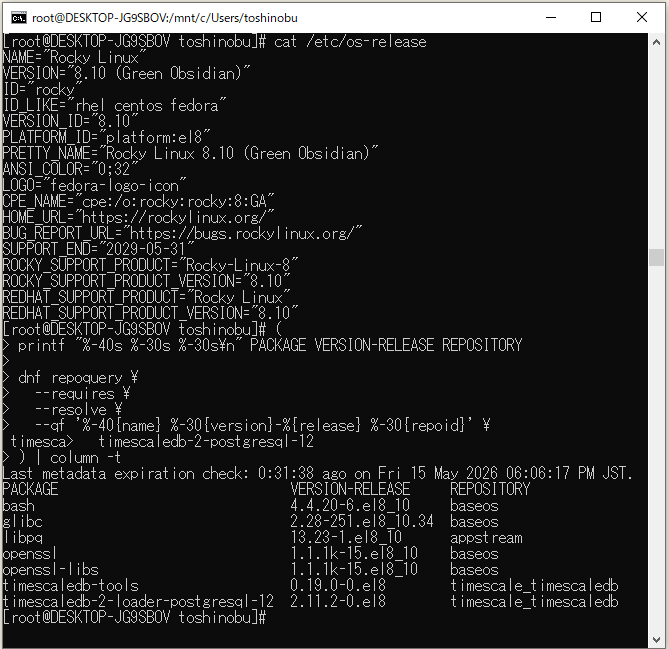
⇧ 上記によると、「timescale_timescaledb」を除くと、
- baseos
- appstream
の2つの「リポジトリ」が必要ということらしい。
と思ったら、resolve を無くしたらば、「PostgreSQL」の「パッケージ」も依存関係に出て来たので、「PostgreSQL」の「パッケージ」の
[root@DESKTOP-JG9SBOV toshinobu]#(
printf "%-40s %-30s %-30s\n" PACKAGE VERSION-RELEASE REPOSITORY

dnf repoquery \
  --requires \
  --qf '%-40{name} %-30{version}-%{release} %-30{repoid}' \
  timescaledb-2-postgresql-12
) | column -t

Last metadata expiration check: 0:51:47 ago on Fri 15 May 2026 06:06:17 PM JST.
PACKAGE                                 VERSION-RELEASE  REPOSITORY
/bin/sh
libc.so.6(GLIBC_2.14)(64bit)
libcrypto.so.1.1()(64bit)
libcrypto.so.1.1(OPENSSL_1_1_0)(64bit)
libpq.so.5()(64bit)
libssl.so.1.1()(64bit)
libssl.so.1.1(OPENSSL_1_1_0)(64bit)
openssl
postgresql12                            >=               12
postgresql12                            >=               12.0
postgresql12                            >=               12.6
postgresql12                            >=               12.8
postgresql12-server                     >=               12
postgresql12-server                     >=               12.0
postgresql12-server                     >=               12.6
postgresql12-server                     >=               12.8
rtld(GNU_HASH)
timescaledb-2-loader-postgresql-12      >=               2.0.0
timescaledb-2-loader-postgresql-12      >=               2.0.0~rc2
timescaledb-2-loader-postgresql-12      >=               2.0.0~rc3
timescaledb-2-loader-postgresql-12      >=               2.0.0~rc4
timescaledb-2-loader-postgresql-12      >=               2.0.1
timescaledb-2-loader-postgresql-12      >=               2.0.2
timescaledb-2-loader-postgresql-12      >=               2.1.0
timescaledb-2-loader-postgresql-12      >=               2.1.1
timescaledb-2-loader-postgresql-12      >=               2.10.0
timescaledb-2-loader-postgresql-12      >=               2.10.1
timescaledb-2-loader-postgresql-12      >=               2.10.2
timescaledb-2-loader-postgresql-12      >=               2.10.3
timescaledb-2-loader-postgresql-12      >=               2.11.0
timescaledb-2-loader-postgresql-12      >=               2.11.1
timescaledb-2-loader-postgresql-12      >=               2.11.2
timescaledb-2-loader-postgresql-12      >=               2.2.0
timescaledb-2-loader-postgresql-12      >=               2.2.1
timescaledb-2-loader-postgresql-12      >=               2.3.0
timescaledb-2-loader-postgresql-12      >=               2.3.1
timescaledb-2-loader-postgresql-12      >=               2.4.0
timescaledb-2-loader-postgresql-12      >=               2.4.1
timescaledb-2-loader-postgresql-12      >=               2.4.2
timescaledb-2-loader-postgresql-12      >=               2.5.0
timescaledb-2-loader-postgresql-12      >=               2.5.1
timescaledb-2-loader-postgresql-12      >=               2.5.2
timescaledb-2-loader-postgresql-12      >=               2.6.0
timescaledb-2-loader-postgresql-12      >=               2.6.1
timescaledb-2-loader-postgresql-12      >=               2.7.0
timescaledb-2-loader-postgresql-12      >=               2.7.1
timescaledb-2-loader-postgresql-12      >=               2.7.2
timescaledb-2-loader-postgresql-12      >=               2.8.0
timescaledb-2-loader-postgresql-12      >=               2.8.1
timescaledb-2-loader-postgresql-12      >=               2.9.0
timescaledb-2-loader-postgresql-12      >=               2.9.1
timescaledb-2-loader-postgresql-12      >=               2.9.2
timescaledb-2-loader-postgresql-12      >=               2.9.3
timescaledb-tools                       >=               0.8
[root@DESKTOP-JG9SBOV toshinobu]#
う~む...
残念ながら、「リポジトリ」がインストールされている状態で無いと、正確な「情報」が取得できないという残念な仕様になっているっぽい...
「依存パッケージ」から「依存リポジトリ」を逆引きすることはできないらしい...
つまり、
- 依存パッケージのみの結果
- 依存パッケージと依存リポジトリの結果
の差分を取って、「依存パッケージ」の属する「依存リポジトリ」を特定するしか無さそうではある...
ちなみに、
⇧「RHEL(Red Hat Enterprise Linux)」系の「Linux ディストリビューション」の「パッケージ管理ツール」の使い方については、上記サイト様が詳しいです。
あとは、
⇧ 上記で「Red Hat」が『YUM コマンドチートシート for Red Hat Enterprise Linux』なる「ドキュメント」を公開してくれてはいるようなのですが、
- 参照系
- 更新系
の区別が整理されていないこともありで、気軽に試せないのよね...
となって来ると、
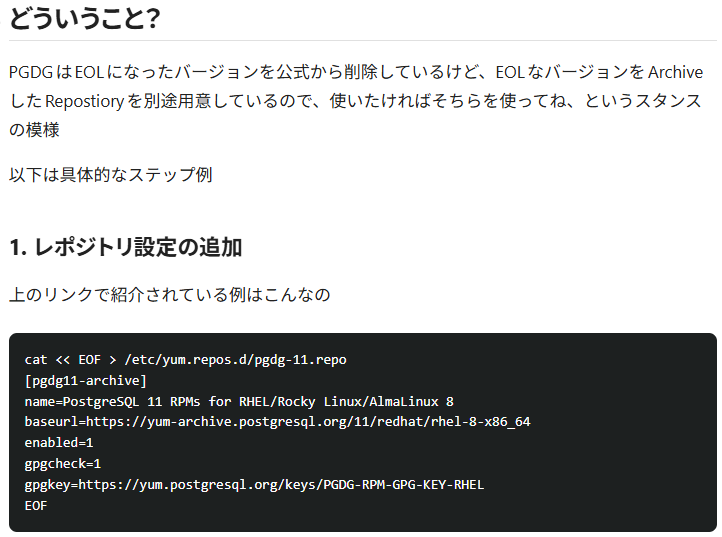
⇧ 上記サイト様にありますように、「アーカイブ」された場所を「baseurl」として指定する必要がありそうね...
とりあえず、
- アーカイブされる前のパッケージのリポジトリ
- アーカイブされた後のパッケージのリポジトリ
で互換性が無いと厳しいのだが...
まぁ、
⇧ 公式の「ドキュメント」で、そのあたりの「情報」が見事に端折られているのよね...
毎度モヤモヤ感が半端ない…
今回はこのへんで。
