
タレスDISジャパンは、年次報告書「悪性ボットに関する報告 2025年版」を発表した。これによると、インターネットトラフィックにおいてボットが初めて人間を上回り、AIの利用拡大に伴うサイバー脅威の拡大もより明確になった。
報告書は、Thales傘下のImpervaがインターネットにおける自動化ボットのトラフィックを分析した結果を取りまとめたもの。2024年の状況を対象にした2025年版は12回目となる。
⇧ 分析元の情報が気になりますな...
本当に正確に、
- 人間
- ボット
のアクセスの区別ができているのだろうか...
膨大なトラフィックを判別できるロジックやアルゴリズムがあるんかな?
tcpdump とは?
Wikipediaによると、
tcpdumpとは、コマンドライン上で利用する一般的な計算機ネットワーク調査ツールである。 tcpdumpにより、利用者はコマンドを実行した計算機がつながっているネットワーク上を流れるTCP/IPなどのパケットを横取って、表示させることが出来る。 このプログラムは開発当時にローレンス・バークリー研究所ネットワーク研究グループに所属していたバン・ジェイコブソン、Craig Leres、Steven McCanneによって書かれた。
tcpdumpはほとんどのUnix系オペレーティングシステム上で動作する。 たとえば、BSD系Unix、Solaris、Linux、HP-UX、AIX、macOSなどで動作する。 これらのシステムでは、tcpdumpはpcapライブラリ上に構築されている。
⇧ 一般的な「Linuxディストリビューション」であれば、大体使用できると考えて差し支えない模様。
とりあえず、
Unix系オペレーティングシステムやその他の多くのオペレーティングシステムでは、 tcpdumpを使うにはスーパーユーザーになる必要がある。 なぜなら、tcpdumpはプロミスキャス・モードを利用するからである。 -Z オプションを使うことで、キャプチャをセットアップした後でスーパーユーザー権限を破棄することができる。
また別のUnix系オペレーティングシステムではスーパーユーザー権限なしでパケットキャプチャのメカニズムを利用できるように設定できる。
⇧「スーパーユーザー」の権限が必要ですと。
Dockerコンテナ間の通信をtcpdumpしたい
ネットの情報を漁っていたところ、
Dockerコンテナ上でどんなキャプチャが流れてるかを確認したくて調べたのでメモ。
最初は、普通にコンテナ上にtcpdumpを入れてdocker execでbash経由でログインして確認してたのですが、
結構めんどくさい。また、Volumeとか切ってないと、tcpdumpの結果を取り出すのも一苦労。
そこで他の方法を探していたところ、Dockerのネットワークはホスト側のコンテナ接続用の仮想ブリッジ「docker0」を常に経由しているようです。
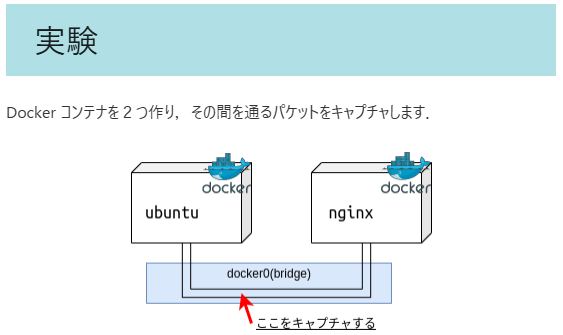
⇧ といった感じで、「docker0」というネットワークに対して、パケットキャプチャすれば良いらしい。
なので、Dockerコンテナを起動後、
sudo tcpdump -i docker0 -X -s 0 -w [ファイルの保存場所][ファイル名][ファイル拡張子(「.cap」or「.pcap」)]
⇧ 上記のコマンドを実行して、外部からリクエストを「Dockerコンテナ」に向けて実行すれば、Dockerコンテナ間で通信が発生するので(アプリケーションの作りが通信するようになっていれば)、パケットキャプチャが実行されて「.cap」ファイルが保存されると。
「.cap」ファイルが保存されたのを確認したら、「Ctrl + C」で「tcdump」のプロセスを終了する感じになると。
ちなみに、「tcpdump」の「マニュアル」のページによると、
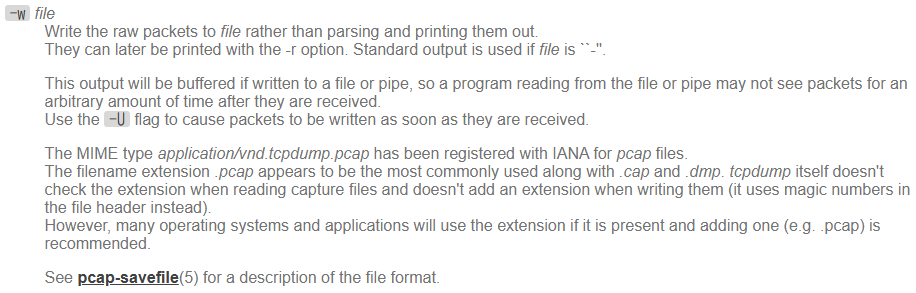
-wfile- Write the raw packets to file rather than parsing and printing them out.
They can later be printed with the -r option. Standard output is used if file is ``-''. - This output will be buffered if written to a file or pipe, so a program reading from the file or pipe may not see packets for an arbitrary amount of time after they are received.
Use the-Uflag to cause packets to be written as soon as they are received. - The MIME type application/vnd.tcpdump.pcap has been registered with IANA for pcap files.
The filename extension .pcap appears to be the most commonly used along with .cap and .dmp. tcpdump itself doesn't check the extension when reading capture files and doesn't add an extension when writing them (it uses magic numbers in the file header instead).
However, many operating systems and applications will use the extension if it is present and adding one (e.g. .pcap) is recommended. - See pcap-savefile(5) for a description of the file format.
⇧ 上記の「-w」オプションで、
『However, many operating systems and applications will use the extension if it is present and adding one (e.g. .pcap) is recommended.』
とあることから、「ファイル」に出力する際の「拡張子」としては、「.pcap」も利用できるみたい。
というよりも、
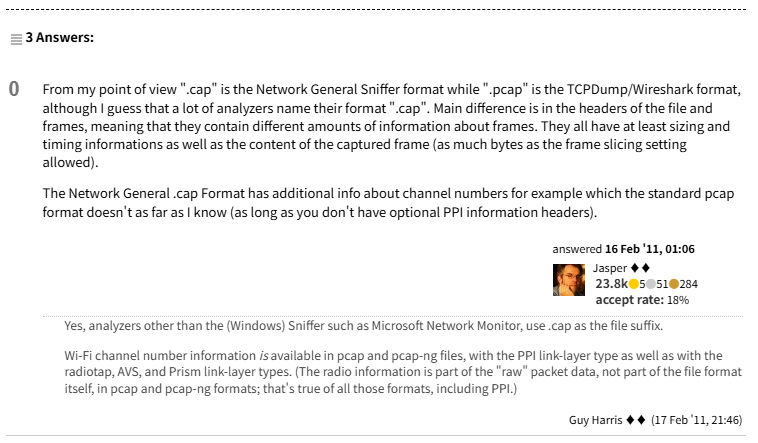
From my point of view ".cap" is the Network General Sniffer format while ".pcap" is the TCPDump/Wireshark format, although I guess that a lot of analyzers name their format ".cap". Main difference is in the headers of the file and frames, meaning that they contain different amounts of information about frames. They all have at least sizing and timing informations as well as the content of the captured frame (as much bytes as the frame slicing setting allowed).
The Network General .cap Format has additional info about channel numbers for example which the standard pcap format doesn't as far as I know (as long as you don't have optional PPI information headers).
https://osqa-ask.wireshark.org/questions/2360/difference-between-cap-and-pcap-formats/
⇧ 上記サイト様によりますと、
- .cap
- the Network General Sniffer format
- .pcap
ということらしく、「Wireshark」とか利用する想定であるならば、「2. .pcap」の「拡張子」を利用しておいた方が良さそう。
話を「Dockerネットワーク」に戻すと、
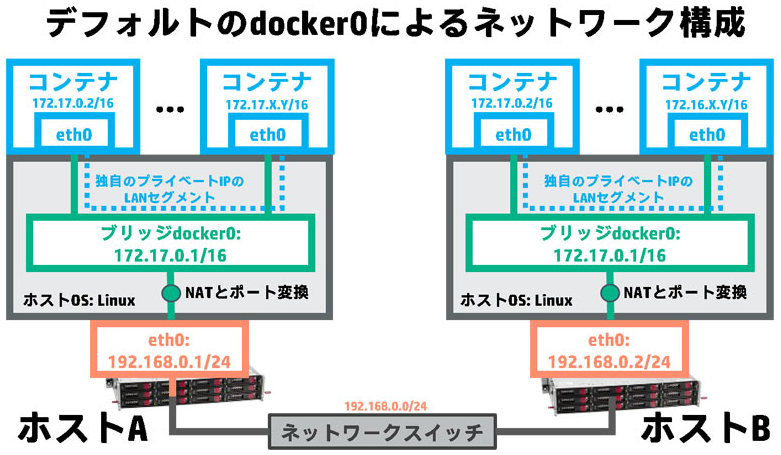
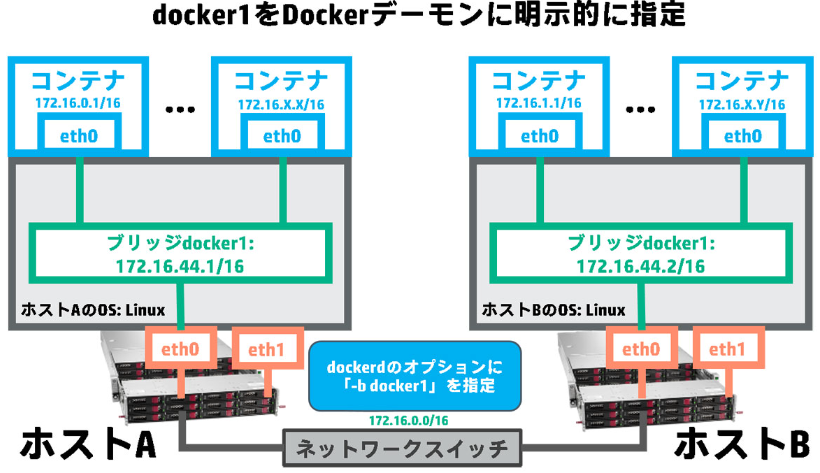
⇧「docker0」じゃない名前になっていることもあるという感じなんですかね?
何やら、
Docker をインストールした全ての環境には、 docker0 と表示されるブリッジ( bridge )ネットワークが現れます。オプションで docker run --net=<ネットワーク名> を指定しない限り、Docker デーモンはデフォルトでこのネットワークにコンテナを接続します。ホスト上で ifconfig コマンドを使えば、ホストネットワーク上のスタックの一部として、このブリッジを見ることができます。
https://docs.docker.jp/engine/userguide/networking/dockernetworks.html
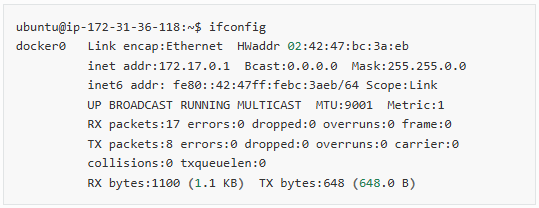
⇧ デフォルトの「docker0」なる「Dockerネットワーク」を確認する場合は、「ifconfig」とかで確認する感じになるらしい...
「Docker」で作成される「ネットワーク」なのだから、「docker network ls」で表示できるようにしておいて欲しいんだが...
毎度モヤモヤ感が半端ない…
今回はこのへんで。
